

Everything You Should Know About Squelch On A Marine Radio
Why is Squelch an Important Feature on a Marine Radio?
Squelch is a critical feature on a marine radio for several reasons: • Improved SafetyBy eliminating distracting static, squelch allows you to concentrate on your navigation and vessel operations without constant background noise. • Reduced Power Consumption
Constantly broadcasting static uses more power. By muting the speaker until a valid transmission is received, squelch helps to conserve the battery life of your radio which is crucial for handheld units and vessels with limited power. • Better Communication
Correctly adjusting the squelch ensures you hear all incoming transmissions, even weaker ones, without having to endure the constant static.
Is There a Best Setting for Squelch?
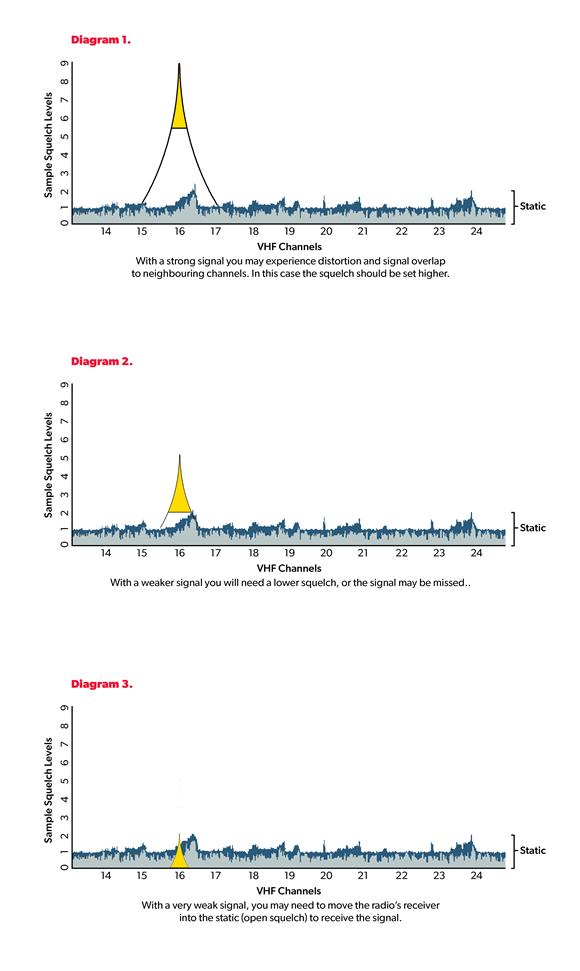
The "best" squelch setting is not a fixed number. It is the lowest possible setting that successfully eliminates all background static. The ideal setting will change depending on various factors including your location, the time of day, weather conditions and other electronic equipment in use on your vessel. Because of these variables, you should not set and forget your squelch. It's a setting that needs to be checked and adjusted regularly to ensure optimal performance. A Simple 4-Step Process For Adjusting Squelch To ensure your radio is always set correctly you should adjust the squelch every time you turn your radio on. A good rule of thumb is to check it at least once per watch while underway. Step 1: Turn the volume and squelch to minimum.Start by turning both the volume and squelch controls all the way down. On some radios the volume control also doubles as the on/off switch. Step 2: Increase the volume.
With the squelch at its minimum, slowly increase the volume until you can hear the background static clearly. This provides the audio reference you need to set the squelch correctly in the next step. Step 3: Increase the squelch.
Now, slowly turn up the squelch control. You will hear the static begin to fade. Continue to increase the squelch until the point where the static just disappears. Stop right there. This is your ideal squelch setting. At this point, your radio is rejecting signals that are below the strength of the background static. Any voice broadcast will be stronger than the static ensuring it will "break through" the squelch threshold. Step 4: Make a final volume adjustment.
With the squelch set correctly, you now need to adjust the volume to a comfortable listening level. This may be louder than the level you used in step 2. Ensure the volume is loud enough for you to hear transmissions clearly from your normal operating position.
Other Things to Think about with Squelch
• Squelch and TransmissionYour squelch setting only affects how your radio receives signals, not how it transmits them. When you press the PTT (Push-to-Talk) button, your radio broadcasts a signal regardless of the squelch setting. • Troubleshooting a lack of replies
If you make a call and don't receive a reply the issue might not be with your transmission. The other vessel may not have heard you because their squelch is set too high. Likewise, you may have missed their reply because your squelch is set too high. Always check your squelch and volume settings if you expect a transmission and don't receive one. • Power Settings
While your squelch setting doesn't affect your transmission, the power setting of your radio does. If you need to make a long-range transmission, ensure your radio is set to high power (25 watts on a fixed radio or 5 or 6 on a handheld) and not low power (1 watt) to maximise the chance of your signal breaking through the squelch of a distant radio. We hope that this information is useful. Further information about adjusting the squelch on your Icom marine radio can be found in its product manual. To watch a video on our YouTube channel about this subject, click on: Video: 'Changing Squelch on a Marine VHF Radio'.